
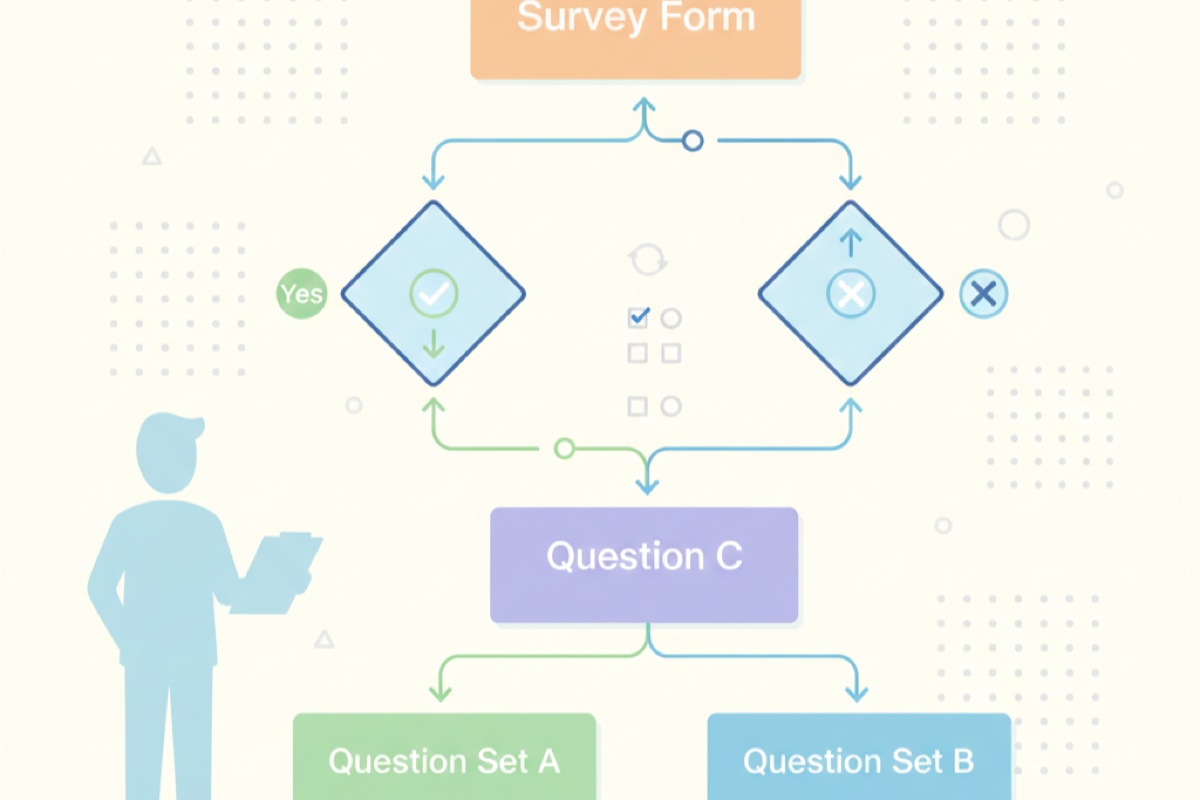
Every survey respondent has had the experience: you answer a question that clearly doesn't apply to you, then another, and another. By the fifth irrelevant question, you abandon the survey entirely. This is exactly what happens when surveys take a "one-size-fits-all" approach. Conditional logic solves this problem by adapting the survey in real time based on each respondent's answers, creating a smarter, shorter, and more relevant experience for everyone.
What is conditional logic in surveys?
Conditional logic, also known as skip logic or branching logic, is a feature that dynamically changes which questions a respondent sees based on their previous answers. Instead of presenting every question to every person, the survey adapts its path depending on the responses given.
How it works in practice
Think of conditional logic as a decision tree. At certain points in the survey, the respondent's answer triggers a rule that determines what they see next. For example:
- A customer who rates their experience as "poor" gets follow-up questions about what went wrong
- A customer who rates their experience as "excellent" gets asked what they enjoyed most
- A respondent who says they haven't used a feature skips all questions about that feature
Simple example: Question 1 asks "Have you used our mobile app?" If the respondent answers "Yes," they see questions about the app experience. If they answer "No," those questions are skipped entirely and they move to the next relevant section.
The respondent never sees the logic happening behind the scenes. From their perspective, every question feels relevant and purposeful because it is.
Why conditional logic matters for survey quality
Adding conditional logic to your surveys isn't just a nice-to-have feature. It directly impacts three critical aspects of survey effectiveness.
Shorter surveys lead to higher completion rates
Research consistently shows that longer surveys have lower completion rates. Every additional question increases the chance that a respondent will drop out before finishing. Conditional logic keeps surveys short by ensuring each person only sees questions that are relevant to them.
A 30-question survey might only present 12-15 questions to any given respondent when conditional logic is applied well. The survey contains the same depth of questioning, but each individual path is concise and focused.
Impact on completion rates: Surveys that use conditional logic to reduce irrelevant questions typically see completion rates 15-25% higher than their static equivalents. When respondents feel that every question matters, they're far more likely to finish.
More relevant questions produce better data
When respondents encounter questions that don't apply to them, several things happen, and none of them are good for your data:
- They select random answers just to move forward
- They choose "N/A" or neutral options even when those aren't meaningful
- They start rushing through the rest of the survey, giving less thoughtful answers
- They abandon the survey entirely, creating non-response bias
Conditional logic eliminates these problems. Every answer you collect comes from someone for whom the question was genuinely relevant, which means your data is cleaner and more actionable.
Improved respondent experience
Respondents notice when a survey respects their time. A survey that asks smart follow-up questions based on previous answers feels like a conversation rather than an interrogation. This positive experience has downstream benefits: respondents are more willing to take future surveys, more likely to give thoughtful answers, and less likely to develop survey fatigue.
Common conditional logic patterns
While the possibilities are nearly endless, most conditional logic in surveys follows a handful of well-established patterns.
Show or hide questions based on previous answers
This is the most basic and most common pattern. A specific answer to one question determines whether the respondent sees one or more follow-up questions.
Example:
- Question: "Did you contact our support team in the last 30 days?"
- If "Yes" → Show questions about support quality, response time, and resolution
- If "No" → Skip to the next section
Skip to a section based on a response
Rather than showing or hiding individual questions, this pattern sends respondents to entirely different sections of the survey. This is useful when different groups of respondents need completely different sets of questions.
Example:
- Question: "What is your role?" (Options: Manager, Individual contributor, Executive)
- Manager → Jump to the management-specific section
- Individual contributor → Jump to the individual contributor section
- Executive → Jump to the executive section
Display different endings based on score ranges
For surveys that include rating questions like NPS, CSAT, or CES, you can tailor the follow-up experience based on the score given. This is particularly valuable for understanding the "why" behind different ratings.
Example with NPS:
- Score 9-10 (Promoters) → "We're glad you're enjoying the product! What do you value most?"
- Score 7-8 (Passives) → "Thanks for your feedback. What could we improve to earn a higher rating?"
- Score 0-6 (Detractors) → "We're sorry to hear that. What was your main disappointment?"
Why this matters: Generic follow-up questions produce generic answers. When you ask a detractor "What was your main disappointment?" rather than "Do you have any additional feedback?", you get specific, actionable insights that drive real improvements.
Qualifying questions to screen out irrelevant respondents
Sometimes you need to ensure respondents meet certain criteria before they continue. A qualifying question at the beginning of the survey can route people who don't meet the criteria to a polite thank-you message, while qualified respondents continue with the full survey.
Example:
- Question: "Have you purchased from us in the last 6 months?"
- If "Yes" → Continue to the main survey
- If "No" → Show a thank-you message explaining that the survey is for recent customers
Real-world examples
Let's look at how conditional logic plays out in common survey scenarios that you might encounter in your own work.
Customer feedback survey with branching by satisfaction level
A SaaS company sends a quarterly satisfaction survey. The first question asks customers to rate their overall satisfaction on a 1-5 scale. The rest of the survey adapts based on that answer:
- Satisfied customers (4-5): See questions about what features they use most, whether they'd recommend the product, and what new features they'd like to see
- Neutral customers (3): See questions about what's preventing them from being more satisfied, what competitors they've evaluated, and what one change would make the biggest difference
- Dissatisfied customers (1-2): See questions about their specific frustrations, whether they've contacted support, and what it would take to improve their experience
Each path is 8-10 questions long, but the full survey contains over 25 questions. No single respondent sees all of them.
Product research survey with feature-specific follow-ups
A product team wants feedback on five new features they've launched. Rather than asking every user about every feature, they start with a multi-select question: "Which of the following features have you used?"
The survey then shows detailed follow-up questions only for the features each respondent has actually used. A user who has tried two of the five features sees a focused 10-question survey instead of a marathon 30-question one.
Event registration with conditional workshop selection
A conference registration form asks attendees about their experience level (beginner, intermediate, advanced). Based on the response, the form shows only workshops appropriate for that level. Advanced attendees don't see beginner workshops cluttering their selection, and beginners aren't overwhelmed by advanced options they're not ready for.
Employee engagement survey with role-specific sections
An HR team runs an annual engagement survey across the entire company. After the core questions that everyone answers, the survey branches based on department and management level:
- Managers see questions about their team dynamics, workload distribution, and leadership support
- Individual contributors see questions about career development, autonomy, and direct manager effectiveness
- Remote employees see additional questions about communication tools and work-from-home support
- New hires (less than 6 months) see questions about onboarding quality and early experience
This approach gives the HR team detailed, role-specific insights while keeping the survey manageable for every employee.
Best practices for conditional logic surveys
Conditional logic is powerful, but it needs to be implemented thoughtfully to work well. Follow these best practices to get the most out of your branching surveys.
Map your logic before building
Before you start creating questions, sketch out the survey flow on paper or in a diagramming tool. Identify:
- Which questions everyone will see (your core path)
- Where branching points occur
- What conditions trigger each branch
- Where branches rejoin the main path (if they do)
- What the end state looks like for each possible path
Planning tip: A simple flowchart is the best way to visualize your survey logic. Draw boxes for questions and diamonds for decision points. This makes it easy to spot potential problems before you've built anything.
Keep branching paths manageable
It's tempting to create highly personalized paths for every possible combination of answers. Resist this temptation. Every additional branch increases complexity, makes testing harder, and creates more opportunities for errors.
A good rule of thumb: aim for 3-5 distinct paths at most. If you find yourself creating more than that, consider whether you should split the survey into multiple smaller surveys instead.
Test every path
This might be the single most important best practice. Before launching your survey, walk through every possible path from start to finish. Verify that:
- Each path makes logical sense and flows naturally
- No path leads to a dead end or loops back unexpectedly
- The question count for each path is reasonable
- Follow-up questions are contextually appropriate for the answers that triggered them
Ask a colleague to test the survey without explaining the logic. If they find the experience confusing or hit any dead ends, you have work to do.
Use clear question flow
Even with branching, the survey should feel like a natural conversation. Avoid abrupt topic changes when transitioning between sections. Use brief transitional text when needed, such as "Now let's talk about your support experience" before jumping into support-related questions.
Make sure that every question a respondent sees makes sense in the context of what they've already answered. If a question references a previous answer, verify that the respondent actually saw that previous question on their particular path.
Common mistakes to avoid
Even experienced survey designers make these mistakes when working with conditional logic. Knowing about them in advance helps you avoid them.
Infinite loops
An infinite loop occurs when the logic sends a respondent back to a question they've already answered, creating a cycle they can never escape. This usually happens when conditions are set incorrectly or when multiple branching rules conflict with each other.
How to prevent it: Always ensure that every branch moves the respondent forward in the survey. Never create a condition that points back to an earlier question. When mapping your logic, check that all arrows point downward or forward in your flow diagram.
Orphaned questions
An orphaned question is one that no path in the survey ever reaches. It exists in the survey but no combination of answers will ever display it. This usually happens when you modify branching rules after building questions, accidentally disconnecting some questions from all paths.
How to prevent it: After making any changes to your branching logic, trace through every path to confirm that all questions are reachable. Remove any questions that are no longer part of any path.
Too many branches
Overcomplicating your survey with too many branching paths creates several problems:
- Some paths may get very few responses, making the data statistically unreliable
- Testing becomes exponentially harder with each new branch
- Maintaining and updating the survey becomes a nightmare
- It's easier to introduce logical errors when the complexity is high
How to prevent it: Follow the principle of minimal branching. Only create a new branch when the respondent's experience would be materially worse without it. If two paths are very similar, consider combining them and using one or two conditional questions instead of a full separate branch.
Not testing all paths
This is the most common mistake and the easiest to make. When a survey has multiple paths, testers often check the "happy path" and assume the others work. But errors tend to hide in the less-traveled paths, the ones triggered by unusual or minority responses.
How to prevent it: Create a testing checklist that lists every possible path through the survey. Assign each path to a tester and require sign-off before launch. For surveys with many paths, consider using a spreadsheet to track which paths have been tested and by whom.
Testing checklist: For each path, verify these five things: (1) all questions display correctly, (2) the logic triggers at the right points, (3) the path length is reasonable, (4) the final page or thank-you message is appropriate, and (5) the data collected makes sense when reviewed in the results.
How AskUsers helps with conditional logic
AskUsers includes a display rules feature that makes it straightforward to add conditional logic to your surveys without any coding or complex configuration.
Display rules: conditional logic made simple
With display rules in AskUsers, you can control which questions appear based on respondents' previous answers. The feature works through a visual interface where you set conditions for each question or section, specifying when it should be shown or hidden.
Key capabilities of display rules in AskUsers:
- Condition-based visibility: Show or hide questions based on answers to previous questions
- Multiple conditions: Combine conditions to create precise targeting (e.g., show this question only if the user selected "Yes" on question 3 AND rated satisfaction above 3)
- Works with all question types: Set conditions based on rating scales, multiple choice, single choice, and other question types
- Preview before publishing: Walk through your survey before going live to verify that every path works correctly
No coding required: Display rules are configured entirely through the survey builder interface. You select the question, define the condition, and choose what should happen. The survey handles the rest automatically when respondents fill it out.
Building a survey with display rules
Here's a practical workflow for creating a conditional logic survey with AskUsers:
- Create your survey: Add all your questions in the survey builder, including questions for every branch
- Identify branching points: Decide which questions should trigger conditional behavior
- Set display rules: For each conditional question, define the rule that controls when it appears
- Preview and test: Walk through every path using the preview function to verify the logic works
- Publish: Once you've confirmed all paths work correctly, share your survey via embed, link, or any other distribution method
The result is a survey that feels personalized to each respondent while being simple to build and maintain on your end.
Frequently asked questions
How many branching points should a survey have?
There's no hard limit, but 3-5 branching points is a practical range for most surveys. More than that increases complexity and testing effort significantly. If you need more, consider splitting your survey into multiple shorter surveys, each focused on a specific audience or topic.
Does conditional logic affect my response data?
Yes, in a positive way. Because not every respondent sees every question, some questions will have fewer responses than others. This is expected and desirable. The responses you do collect are more relevant and reliable because they come from people for whom the question was genuinely applicable.
Can I use conditional logic with NPS or CSAT surveys?
Absolutely. This is one of the most effective uses of conditional logic. After a respondent gives their NPS or CSAT rating, you can show different follow-up questions based on their score. Promoters get questions about what they love, while detractors get questions about what went wrong. This produces far more actionable feedback than a generic follow-up question.
What if a respondent goes back and changes an answer that triggers a branch?
Good survey tools handle this automatically. If a respondent changes an answer that affects which questions are visible, the display rules re-evaluate and show or hide questions accordingly. Any answers to questions that are no longer visible should be cleared to avoid collecting inconsistent data.
Is conditional logic the same as skip logic?
The terms are often used interchangeably, though there are subtle differences. Skip logic specifically refers to skipping over questions or sections based on a response. Conditional logic is a broader term that includes skip logic but also encompasses showing additional questions, changing answer options, and other dynamic behaviors. In practice, most survey platforms (including AskUsers) support both under a single feature set.
How do I analyze data from a survey with conditional logic?
The main thing to keep in mind is that different questions will have different response counts. When reporting results, always note the base size (number of respondents who saw that question) alongside percentages. Avoid comparing raw response counts between questions that appeared on different paths, as the populations are different by design.
Can conditional logic reduce survey bias?
Yes. By eliminating irrelevant questions, conditional logic reduces several forms of bias. Respondents are less likely to give random or thoughtless answers when every question feels relevant. It also reduces non-response bias by keeping surveys short enough that more people complete them, giving you a more representative sample overall.
Start building smarter surveys
Conditional logic transforms surveys from static questionnaires into dynamic conversations. By showing each respondent only the questions that matter to them, you collect better data, get higher completion rates, and create a more respectful experience for everyone involved.
The key is to start simple. Pick one survey where you know certain questions only apply to a subset of respondents. Add a single branching point and measure the impact on completion rates and data quality. Once you see the results, you'll want to apply conditional logic to every survey you build.
Create smarter surveys with display rules
AskUsers makes it easy to add conditional logic to your surveys with our display rules feature. Build dynamic surveys that adapt to each respondent, no coding required.