You spent hours crafting the perfect form. The questions are clear, the design is polished, and responses are flowing in. But then what? For most teams, the answer is disappointing: the data sits in a spreadsheet, waiting for someone to manually copy it somewhere useful. That gap between collecting responses and actually acting on them is where opportunities go to die.
The truth is, collecting form responses is only half the job. What you do with those responses afterward determines whether your forms create real business value or just generate busywork. And the most effective way to bridge that gap is automation through webhooks.
In this guide, you will learn exactly how webhooks work, what you can automate, and how to set up your first integration so that every form submission triggers the right action automatically.
The problem with manual response processing
Before diving into solutions, let's acknowledge why manual form processing is so painful. If any of these scenarios sound familiar, you are not alone.
Data trapped in spreadsheets
A form submission arrives. Someone downloads the CSV, opens it in a spreadsheet, and starts sorting through rows. The data stays locked in that file until someone manually moves it to the system where it is actually needed, whether that is a CRM, a project management tool, or an email platform.
The real cost: Research suggests that knowledge workers spend up to 30% of their time searching for and consolidating data that lives in disconnected systems. Every minute spent copying data between tools is a minute not spent on high-value work.
Manual copy-paste workflows
Without automation, form processing looks something like this:
- Check the form dashboard for new responses
- Copy name, email, and other fields
- Paste them into your CRM or spreadsheet
- Send a follow-up email manually
- Notify your team via chat
- Update your tracking spreadsheet
- Repeat for every single submission
This process is tedious, error-prone, and completely unsustainable as your volume grows. One person might manage 10 submissions a day manually. What happens when you get 100? Or 1,000?
Delayed follow-up
Speed matters. When someone fills out a lead form, they expect a quick response. When a customer submits a complaint, they want to know someone is listening. But manual processing introduces hours or even days of delay between submission and action.
Consider this: Studies consistently show that responding to leads within five minutes dramatically increases conversion rates compared to responding after 30 minutes. Manual processing makes that kind of speed impossible.
What are webhooks and how they work
If you have never worked with webhooks before, the concept is simpler than it sounds. Think of a webhook as an automatic notification that one system sends to another when something happens.
A simple explanation
Imagine you are waiting for an important package. You have two options:
- Polling: Walk to the front door every five minutes to check if the package has arrived (exhausting and inefficient)
- Webhook: Install a doorbell camera that sends you a notification the instant the delivery person arrives (effortless and immediate)
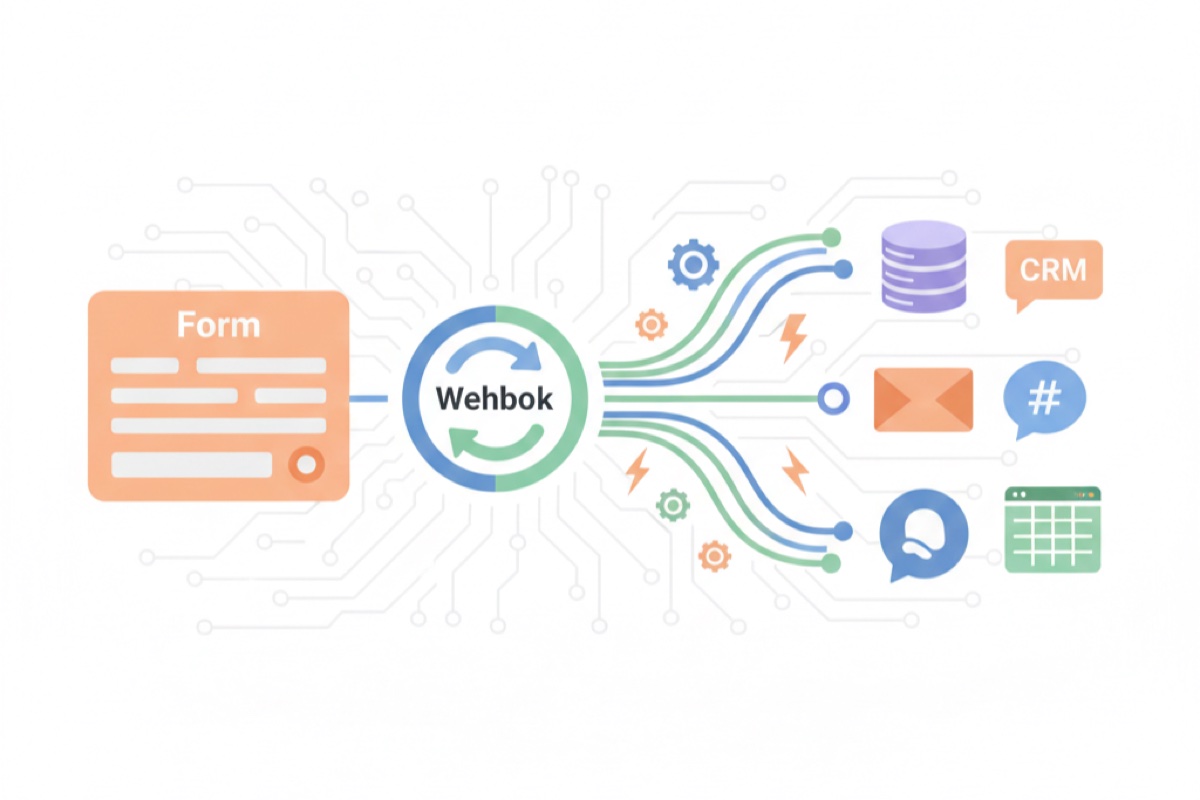
Webhooks work like that doorbell camera. Instead of constantly checking for new form submissions, you tell your form tool: "When someone submits this form, immediately send the data to this URL." The receiving system then processes the data and takes whatever action you have configured.
How a form submission triggers a webhook
Here is what happens behind the scenes when webhooks are configured:
- User submits the form: They click the submit button and see a confirmation message
- Form platform fires the webhook: Within seconds, the platform sends an HTTP POST request to your configured URL
- Data arrives at the destination: The receiving system gets all the form data in a structured format
- Action is triggered: The destination system processes the data and performs the configured action (create a contact, send an email, post a message, etc.)
This entire process happens in seconds, with no human intervention required.
JSON payload structure (conceptual)
When a webhook fires, it sends data in a structured format called JSON. While the exact structure varies by platform, conceptually it looks something like this:
What a webhook payload includes: The payload typically contains the submission timestamp, a unique submission ID, and all form field data organized as key-value pairs. For example, a contact form might send the respondent's name, email address, message, and which page they submitted from. This structured format makes it easy for receiving systems to parse and use the data programmatically.
The beauty of JSON is that it is a universal format. Almost every modern tool and platform can receive and process JSON data, which means webhooks can connect your forms to virtually any system.
What you can automate with webhooks
Once you understand the mechanism, the possibilities become exciting. Here are the most common and impactful automations teams build with form webhooks.
Send data to your CRM
Every lead form submission can automatically create or update a contact record in your CRM. No more manual data entry, no more leads falling through the cracks. The contact appears in your sales pipeline within seconds of submission.
Trigger email sequences
When someone fills out a form, you can automatically trigger a welcome email, a confirmation message, or an entire nurturing sequence. The recipient hears from you instantly, while your team focuses on higher-value interactions.
Post to Slack or Teams channels
Get real-time notifications in your team's communication channels whenever a form is submitted. Your sales team can see new leads instantly. Your support team can spot urgent issues immediately. No one has to check a dashboard or wait for an email.
Update spreadsheets and databases
If your team relies on Google Sheets, Airtable, or similar tools for tracking, webhooks can automatically add new rows with each submission. You get a live-updating record without any manual effort.
Create support tickets
Customer feedback forms and bug reports can automatically generate tickets in your support system. The right team gets notified, priority levels can be set based on form responses, and nothing gets lost in an inbox.
Feed into analytics platforms
Every form submission is a data point. By routing submissions to your analytics tools, you can track conversion rates, identify trends, and measure the effectiveness of your forms in real time.
The compounding effect: Each individual automation saves minutes per submission. But when you chain multiple automations together, a single form submission can trigger an entire workflow that would have taken 15-20 minutes of manual work. At scale, that adds up to hundreds of hours saved per year.
Real automation workflows
Theory is useful, but seeing complete workflows in action makes the value concrete. Here are four practical examples of how teams use webhook automations to eliminate manual work.
Lead generation workflow
Trigger: Someone fills out a "request a demo" form on your website.
Automated sequence:
- Form data is sent to your CRM, creating a new lead record with all submitted information
- A personalized welcome email is sent to the lead within seconds
- A notification posts to the sales team's Slack channel with the lead details
- The lead is added to a nurturing email sequence
- A task is created in your project management tool for the assigned sales rep
Result: The lead receives a response within seconds. The sales team is immediately aware. The follow-up process begins automatically. Zero manual work required.
Customer feedback workflow
Trigger: A customer submits a satisfaction survey.
Automated sequence:
- Response data is stored in your database
- If the rating is below a threshold, an alert is sent to the customer success team
- For negative feedback, a support ticket is automatically created with high priority
- A thank-you email is sent to the customer acknowledging their feedback
- Aggregate scores update in your analytics dashboard in real time
Result: Unhappy customers are identified and reached out to within minutes, not days. Positive feedback is captured and tracked. The team has a real-time pulse on customer sentiment.
Event registration workflow
Trigger: Someone registers for your upcoming webinar or event.
Automated sequence:
- Registration details are sent to your event management system
- A confirmation email with event details and calendar invite is sent immediately
- The registrant is added to a reminder email sequence (one week before, one day before, one hour before)
- Attendance count updates in your tracking spreadsheet
- If capacity is reached, the form automatically closes or adds to a waitlist
Result: Every registrant gets an immediate, professional confirmation. Reminders go out automatically. Your team tracks attendance numbers without lifting a finger.
Job application workflow
Trigger: A candidate submits a job application form.
Automated sequence:
- Application data is sent to your applicant tracking system
- A confirmation email is sent to the candidate with expected timeline
- The hiring manager receives a notification with a summary of the application
- The candidate is tagged and categorized based on their responses (role, experience level, location)
Result: Candidates get immediate acknowledgment. Hiring managers are notified instantly. Applications are organized automatically from the start.
Setting up your first webhook integration
Ready to stop processing form data manually? Here is a step-by-step guide to setting up your first webhook automation.
Step 1: Create your form
Start by building your form with all the fields you need. Think about what data the receiving system will require. If you are sending data to a CRM, make sure you are collecting the fields that match your CRM's contact structure (name, email, company, phone, etc.).
Pro tip: Map out your desired workflow before building the form. Knowing where the data needs to go helps you design form fields that align perfectly with your destination systems.
Step 2: Configure the webhook endpoint
In your form builder's settings, look for webhook or integration options. You will need to provide:
- The destination URL: Where the data should be sent (provided by your receiving system or middleware tool)
- HTTP method: Almost always POST for form submissions
- Authentication: Some endpoints require an API key or token for security
If the destination system does not have a direct webhook intake URL, you can use middleware platforms like Zapier, Make (formerly Integromat), or n8n to bridge the connection.
Step 3: Map fields to your destination
Ensure that each form field maps correctly to the corresponding field in your destination system. For example:
- Form's "Full name" field maps to CRM's "Contact name" field
- Form's "Work email" field maps to CRM's "Email" field
- Form's "Company" field maps to CRM's "Organization" field
Mismatched field mapping is the most common source of integration errors, so take time to get this right.
Step 4: Test the integration
Before going live, submit a test response through your form and verify that:
- The webhook fires correctly (check your destination system for the test data)
- All fields map correctly and contain the expected values
- Any triggered actions (emails, notifications, ticket creation) work as expected
- Edge cases are handled (empty optional fields, special characters, long text responses)
Testing checklist: Submit at least three test responses: one with all fields filled, one with only required fields, and one with edge-case data (special characters, very long text, unusual formatting). This catches the most common integration issues before real data flows through.
Step 5: Monitor and maintain
After launching, do not just set it and forget it. Monitor your webhook integrations regularly:
- Check delivery logs for failed webhook calls
- Verify that data continues to appear correctly in destination systems
- Update field mappings when you change form fields or destination system structures
- Review and clean up automations that are no longer needed
Best practices for webhook automations
Webhook automations are powerful, but they need to be built thoughtfully to remain reliable. Follow these best practices to avoid common pitfalls.
Always validate incoming data
Never blindly trust data coming from form submissions. Your receiving systems should validate that required fields are present, data types are correct, and values are within expected ranges. This prevents bad data from polluting your systems.
Handle failures gracefully with retries
Network issues happen. Servers go down temporarily. Your webhook setup should include retry logic so that failed deliveries are attempted again automatically. Most webhook systems offer configurable retry schedules (e.g., retry after 1 minute, 5 minutes, 30 minutes).
Why retries matter: Without retry logic, a brief network hiccup could mean lost form submissions. With automatic retries, temporary failures resolve themselves without any data loss or manual intervention.
Log everything
Keep detailed logs of every webhook call, including the payload sent, the response received, and the timestamp. When something goes wrong (and eventually it will), logs are your best friend for diagnosing and fixing issues quickly.
Monitor for errors
Set up alerts for webhook failures. You want to know immediately if deliveries start failing, not discover it days later when someone notices missing data. Most webhook platforms offer built-in monitoring and alerting.
Keep payloads clean and structured
Design your forms and webhooks to send clean, well-structured data. Use consistent field naming conventions, avoid unnecessary fields in the payload, and document your webhook structure so that anyone on your team can understand and maintain it.
When NOT to automate (human judgment still matters)
Automation is powerful, but not everything should be automated. There are situations where human review and judgment are essential.
Sensitive decisions: Hiring decisions, customer escalations involving legal issues, or responses that require empathy and nuance should always involve a human. Automation can route these to the right person quickly, but the final decision should be made by a person.
Ambiguous data: When form responses are open-ended or could be interpreted in multiple ways, automated routing might misclassify them. Use automation to flag these for human review rather than taking action automatically.
High-stakes communications: Automated confirmation emails are fine. But personalized responses to angry customers, sensitive feedback, or complex inquiries should be crafted by a real person. Automation can alert your team instantly; the response itself should be human.
The sweet spot: Use automation for data movement, notifications, and routine actions. Use humans for decisions, complex responses, and anything that requires empathy or judgment. The best workflows combine both.
New or unproven workflows: When you are setting up a process for the first time, run it manually for a while before automating. This helps you identify edge cases and refine the process before locking it into an automated system.
How AskUsers webhooks work
AskUsers supports webhook functionality that makes it straightforward to connect your forms and surveys to the rest of your tech stack.
When a form or survey is submitted, AskUsers can send an HTTP POST request to your configured endpoint with a JSON payload containing all the submission data. This means you can connect your forms to any system that accepts webhook data.
What you can do with AskUsers webhooks:
- Receive real-time form submission data at any URL endpoint you configure
- Get structured JSON payloads with all form fields and submission metadata
- Connect to middleware platforms like Zapier or Make to route data to hundreds of destinations
- Build custom integrations with your own backend systems
Whether you are using surveys to collect customer feedback or forms to capture leads and registrations, webhooks let you ensure that every response triggers the right follow-up action automatically.
Getting started: You can configure webhooks for any form or survey in your AskUsers dashboard. Set the destination URL, submit a test response, and verify that your receiving system processes the data correctly. The setup typically takes just a few minutes.
Frequently asked questions
Do I need to know how to code to use webhooks?
Not necessarily. While building custom webhook endpoints requires some technical knowledge, you can use middleware tools like Zapier, Make, or n8n to connect webhooks to hundreds of apps without writing any code. These tools provide visual interfaces for mapping data and configuring actions.
What happens if my webhook endpoint is down when a form is submitted?
Most webhook systems, including AskUsers, implement retry logic. If the initial delivery fails, the system will attempt to resend the data at configured intervals. Your form submissions are not lost; they are queued and retried until delivery succeeds or a maximum retry count is reached.
Can I send form data to multiple destinations at once?
Yes. You can configure multiple webhook endpoints for a single form, sending data to your CRM, email tool, and Slack channel simultaneously. You can also use a middleware tool to receive one webhook and fan it out to multiple destinations.
How secure are webhooks?
Webhook security depends on your implementation. Best practices include using HTTPS endpoints, validating webhook signatures to confirm the source, and authenticating with API keys or tokens. Never send sensitive data to unencrypted HTTP endpoints.
What is the difference between webhooks and APIs?
APIs require you to actively request data (you ask the server for information). Webhooks push data to you automatically when an event occurs (the server tells you when something happens). Webhooks are event-driven and more efficient for real-time scenarios because they eliminate the need for constant polling.
Can I filter which form submissions trigger the webhook?
This depends on your form platform and webhook configuration. Some platforms allow conditional webhooks that only fire when certain criteria are met (e.g., only send to the sales channel if the "budget" field exceeds a certain value). You can also implement filtering logic in your middleware or receiving system.
Start automating your form workflows today
Every form submission that requires manual processing is a missed opportunity for speed, accuracy, and efficiency. Webhooks eliminate the gap between data collection and action, turning your forms from passive data collectors into active workflow engines.
Start small. Pick one form that generates the most manual work, set up a single webhook integration, and measure the time you save. Once you see the impact, you will want to automate every form in your toolkit.
Connect your forms to your entire workflow
AskUsers makes it easy to create forms and surveys with built-in webhook support. Collect responses and automatically send them wherever they need to go, no manual processing required.